Prelude phone verification MCP

Blog /

News

Introducing the Prelude MCP Server

Our most requested feature is here: ask your AI agent about your Prelude data, in plain language

Guillaume Fiette

Software Engineer

At Prelude, giving you the best visibility into your authentication and onboarding has always been a core value. Today, we're releasing an MCP server that lets your AI agent read your Prelude account and answer questions about it in plain language.

MCP, the Model Context Protocol, is the open standard that lets agents like Claude, ChatGPT, Cursor, and VS Code connect to tools and data outside the model.

The server currently covers Verify only, your phone verification data. Auth, Intel/Watch, and Notify are next. This first version has read access only. It can't create, update, or delete anything in your account.

Once your agent is connected to Prelude, you can ask it things like:

  • "How did my verification conversion rate change over the last 30 days?"

  • "Which countries had the lowest conversion rate last week, and what did they cost me?"

  • "Find the verification for +33 6 12 34 56 78 from yesterday and tell me why it failed."

  • "How many verifications were blocked as fraud this week compared to last week?"

  • "What would switching Brazil to the cost strategy change for me?"

  • "Which templates do I have on my app, and what does the default one look like?"

It's a good fit for product managers especially: get an answer to a data question directly, without opening the dashboard or pulling in an engineer.


How to connect

You need a Dashboard account with access to the app, and an agent that supports remote MCP servers. .

To activate the MCP, enter your dashboard and go to the Configure tab. Under the Integrations section, you'll find the MCP section. Toggle the Enable MCP button, and you'll see instructions for various AI agents. Click Save.
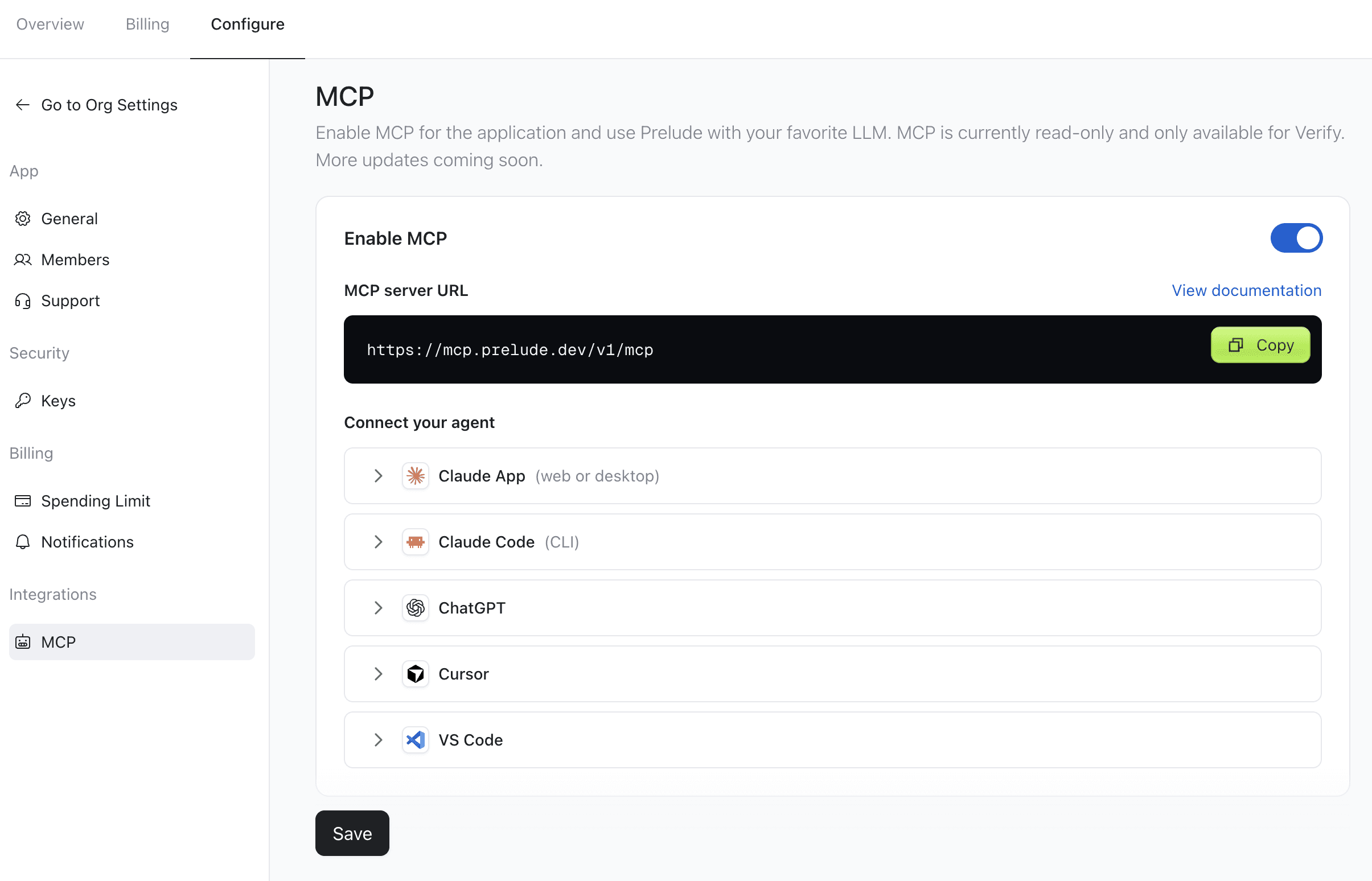

In Claude: open Settings, then Connectors, add a custom connector named Prelude, and paste in the URL. Claude Code, Cursor, ChatGPT, and VS Code each take a similar step, all listed in the docs.

Get started

Full setup instructions for every agent are in the Prelude MCP documentation.

This is just the start. We're bringing MCP support to the rest of our products soon.


At Prelude, giving you the best visibility into your authentication and onboarding has always been a core value. Today, we're releasing an MCP server that lets your AI agent read your Prelude account and answer questions about it in plain language.

MCP, the Model Context Protocol, is the open standard that lets agents like Claude, ChatGPT, Cursor, and VS Code connect to tools and data outside the model.

The server currently covers Verify only, your phone verification data. Auth, Intel/Watch, and Notify are next. This first version has read access only. It can't create, update, or delete anything in your account.

Once your agent is connected to Prelude, you can ask it things like:

  • "How did my verification conversion rate change over the last 30 days?"

  • "Which countries had the lowest conversion rate last week, and what did they cost me?"

  • "Find the verification for +33 6 12 34 56 78 from yesterday and tell me why it failed."

  • "How many verifications were blocked as fraud this week compared to last week?"

  • "What would switching Brazil to the cost strategy change for me?"

  • "Which templates do I have on my app, and what does the default one look like?"

It's a good fit for product managers especially: get an answer to a data question directly, without opening the dashboard or pulling in an engineer.


How to connect

You need a Dashboard account with access to the app, and an agent that supports remote MCP servers. .

To activate the MCP, enter your dashboard and go to the Configure tab. Under the Integrations section, you'll find the MCP section. Toggle the Enable MCP button, and you'll see instructions for various AI agents. Click Save.


In Claude: open Settings, then Connectors, add a custom connector named Prelude, and paste in the URL. Claude Code, Cursor, ChatGPT, and VS Code each take a similar step, all listed in the docs.

Get started

Full setup instructions for every agent are in the Prelude MCP documentation.

This is just the start. We're bringing MCP support to the rest of our products soon.


Start optimizing your auth flow

Send verification text-messages anywhere in the world with the best price, the best deliverability and no spam.